

The Expensive Illusion of the Brand Voice Prompt
Have you ever spent hours perfecting a prompt to get the exact right tone? You paste your brand guidelines into a chatbot. You tell it to "act like an industry expert but remain conversational." Then you hit enter.

The first output might actually look decent. But what happens by the third or fourth follow-up question? The voice flattens out. The personality fades. Before you know it, the AI is handing you back generic, lifeless text.
This is a massive pain point for writers, marketing agencies, and founders. You are trying to scale your content production, but standard AI assistants end up destroying your author voice . Most tools on the market (like Jasper, Writesonic, and Copy.ai) are built around rapid, prompt-based draft generation . They rely on you typing out your rules every single time into an isolated chat window .
It is an expensive distraction. We are told that the right prompt will solve everything. In practice, writers hit real limits when they try to stuff entire rulebooks into a chat window . Pasting a ten-page guide into a chat window fails because chat memory is temporary. Standard chatbots were never built to hold standing editorial rules across an entire project.
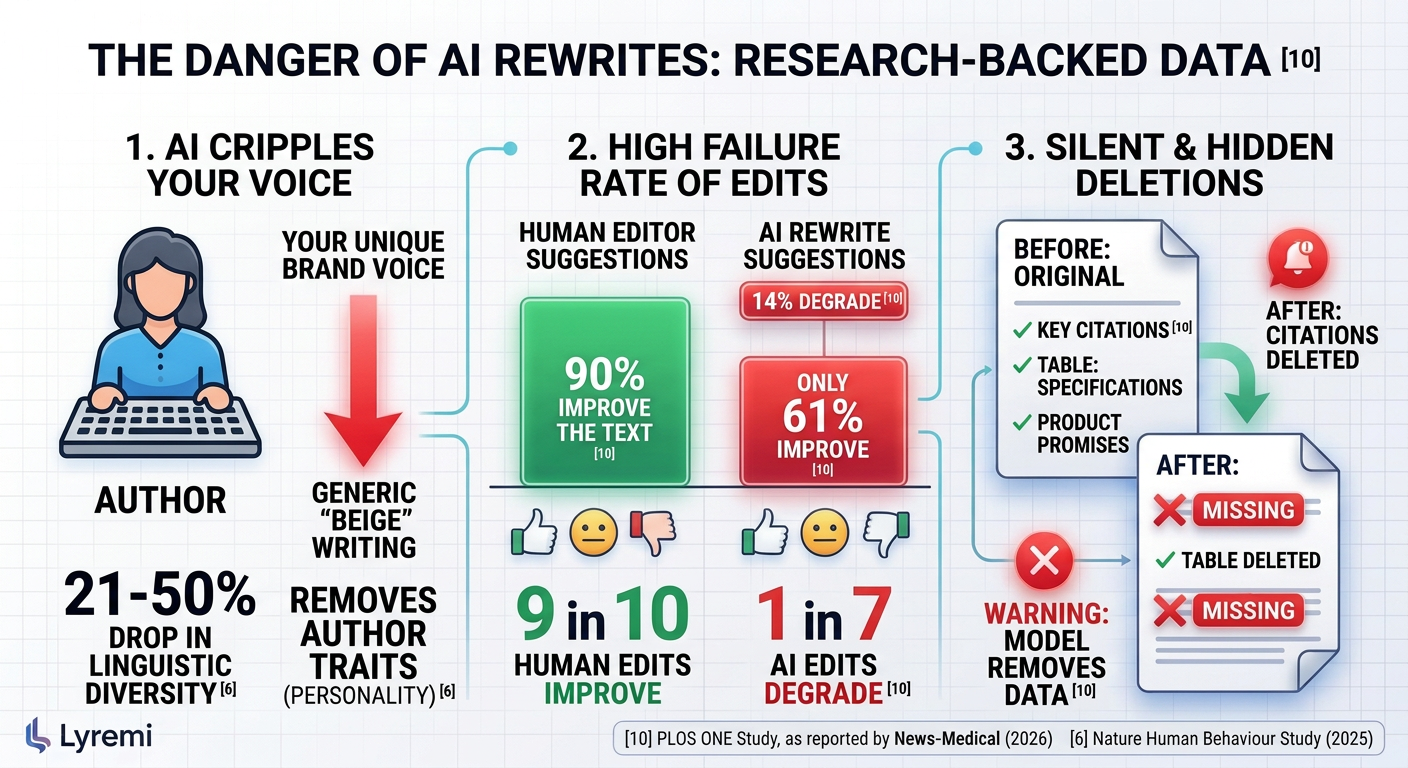
When the machine inevitably forgets your rules, it usually responds by overwriting your whole draft at once. This forces you into an exhausting cycle of "forensic reading" just to figure out what the AI changed and where your brand voice was lost . Why does this happen? Why does a smart tool suddenly act like it has never seen your style guide?
Why AI Chatbots Suffer from Context Amnesia
Why does a smart tool suddenly act like it has never seen your style guide? The AI isn't ignoring your brand voice out of spite. It forgets your rules because of a structural flaw in how large language models read.
Researchers from Stanford University, UC Berkeley, and Samaya AI documented this phenomenon in their 2024 paper. They call it the "Lost in the Middle" problem. When you feed a long document, a detailed style guide, or a lengthy chat history to an AI, the model does not distribute its attention evenly.
Instead, its attention forms a U-shaped curve according to Understanding Data. Here is exactly what that means for your daily work:
Primacy bias: The AI pays incredibly strong attention to the very first things you tell it. The first 1% to 10% of the text gets high priority.
Recency bias: The AI pays strong attention to the very last things you typed. The final 90% to 100% of the prompt is fresh in its working memory.
The forgotten middle: Anything sitting in the middle 40% to 60% of the prompt experiences significant accuracy degradation. The model functionally goes blind to it.
Why does this happen? Attention dilutes across long prompts. As your context window fills up, the model's focus spreads too thin across thousands of tokens as noted in this technical analysis. The system naturally falls back on the absolute beginning of the prompt and your most recent message.
Think about your typical workflow. You paste your brand guidelines at the start of a chat. Then you ask a question. The AI answers. You ask for a revision. As that conversation gets longer, where do your style rules end up? They sink right into the middle of the context window as detailed in Atlan's guide. The model drops your earlier instructions.
To fight this amnesia, writers often turn to prompt stuffing. They paste their entire rulebook into every single new message. This creates massive token bloat .
Have you thought about the actual cost of doing that? Re-sending thousands of style tokens in every basic prompt slows the AI down to a crawl. It also carries compounding financial penalties. In typical tools, you pay the full computational price for every single word you re-send. Even in smart workspaces, long chats loaded with massive, repeated text chunks eat through your monthly allowance much faster than short ones .
This is context amnesia. And it is the reason your carefully crafted voice turns into generic AI filler.
Prompt Engineering vs. Context Architecture

If your brand rules keep vanishing into the middle of the chat, how do you fix it?
Most writing tools push endless guides about prompt tricks . They tell you to just write a better command. But trying to solve memory loss with longer prompts leads nowhere. Operationally, stuffing a 20-page style PDF into a chat box breaks down almost immediately.
Why? Because you end up micro-managing the machine. You paste your massive rulebook into the prompt. The first output looks great. But three messages later, the AI has pushed your rules into that forgotten middle space as researchers observed. To get your voice back, you have to paste the rules again. Repeating yourself in every single message wastes time and ruins your workflow.
Some platforms try to solve this by letting you upload your PDF. They use a standard process called Retrieval-Augmented Generation (RAG). But here is the catch: standard RAG tools slice your documents into disjointed vector chunks . They do not read the whole file. They just blindly search for keywords and pull up isolated paragraphs.
Think about how this fragments your tone. Your style guide is a cohesive document. What happens if page two contains a crucial negative constraint, like "never use exclamation points," while page eight details your brand's conversational tone? Standard RAG splits them up across arbitrary boundaries. When the AI pulls text to write your draft, it might grab the conversational chunk but leave the punctuation rule behind. Your instructions are shattered. The AI breaks your rules because it simply didn't load that specific snippet.
You need a fundamental shift. You need to move from ad-hoc prompt engineering to structured context engineering.
Prompt engineering treats the AI like a short-term text calculator. Context engineering builds an environment where the rules live permanently inside the workspace itself.
The Old Way: Prompt Engineering | The New Way: Context Architecture |
|---|---|
Pasting 20-page rules into every chat box. | Setting standing rules once at the project level. |
Relying on standard RAG blind snippet chunking. | Reading whole documents with smart caching. |
Context gets lost in the middle of long threads. | Rules stay anchored permanently above the chat. |
Fragmented tone and missed negative constraints. | Consistent application of the entire rulebook. |
To keep your voice intact, you need a workspace that actually reads the whole file every single time . When your rules are anchored outside the chat window, the AI cannot push them aside as the conversation grows. When you stop treating the AI like a throwaway chat box and start treating it like a structured workspace, the results change entirely.
How Standing Knowledge Works in Practice
This is where Lyremi takes a completely different path. In Lyremi, your writing software is an integrated environment where your original files stay at the center . Nothing changes in your work unless you say so .
Instead of making you re-type your style guide into every new conversation, Lyremi uses a feature called Knowledge.
Knowledge acts as the standing rules for a specific project . Think of it as a permanent, anchored memory bank that the AI cannot push to the middle and forget. It lives above the chat thread. It governs everything that happens in the workspace.
Here is how it breaks down in practice:
The Rulebook
Have an existing brand guide, voice sheet, or grant requirement document? Bring the file directly into your Lyremi project. Right-click the file and select Add to Knowledge (always follow). This marks the document as a Rulebook . Lyremi reads Rulebook files in full each time it works on that project .
Instructions
You can also open the project's Knowledge and add a few lines of direct Instructions. This is the perfect place to define your core audience, your exact tone, or the specific jargon you want the AI to avoid .
The Golden Rule: Request vs. Knowledge
How do these standing rules interact with your daily typing? It is remarkably simple. Your chat request decides what to write. Knowledge decides how to write it .
If your Knowledge instructions say "never use exclamation points," and you ask the Composer Agent to write a 1,000-word blog post, the agent will write the post without a single exclamation point. The rules hold firm unless you explicitly set one aside in the moment by telling the chat, "em dashes are fine this time" . If a request asks for something a rule forbids, Lyremi says so instead of faking it.
Applied Everywhere, Automatically
From the next request, chats display Following … Knowledge. This means your standing rules apply automatically to every chat, every Research Agent run, and every Composer Agent draft inside that project . You never have to remind the AI who you are.
But doesn't reading a 20-page style guide repeatedly get expensive and slow? It would, if it weren't for smart caching. Lyremi keeps the text it pulls from each file. For long drafts, the Composer Agent caches the files, your Knowledge, and its web findings once per run, reading them at about a tenth of the usual cost .
The AI processes the full text every time. Your rules never get lost in the middle. Your brand voice stays intact.
Comparing Approaches: Prompt Stuffing vs. Standing Knowledge
Why do so many writers accept prompt repetition as normal? They assume that re-entering rules into chat boxes is just how AI writing works.
Standard tools treat your editorial rules like throwaway chat messages [1]. As the thread grows, the guidelines drift into the forgotten middle. The model reverts to generic phrasing.
Lyremi takes a different path. Instead of forcing you to paste your style rules into every single chat box, Lyremi uses standing Knowledge.
How do these two approaches actually stack up against each other?
Feature | Prompt Stuffing (Standard AI) | Standing Knowledge (Lyremi) |
|---|---|---|
Consistency | High at first, but rapidly degrades. Rules get lost in the middle of long chats. | Absolute. Rules apply to every chat, Research Agent run, and Composer Agent draft in the project. |
Setup Overhead | Repetitive. You have to copy, paste, and tweak your instructions for every new request. | Set once. Right-click your style guide and add it to the project. It runs automatically. |
Token Efficiency | Wasteful. You pay to re-process the exact same rules with every follow-up question. | Highly efficient. Lyremi caches the text. Composer reads cached files at a tenth of the usual cost. |
Editor Control | Destructive. The AI usually overwrites your whole draft, forcing you to hunt for what changed. | Non-destructive. The AI brings changes back as inline suggestions. You accept or reject each one. |
Notice the contrast? Prompt stuffing is an ad-hoc patch. It treats voice like an afterthought. Standing Knowledge turns your style guide into permanent workspace infrastructure.
Your request sets the subject matter; Knowledge enforces the voice. You never have to remind the system who you are.
Setting Up Your Workspace Rulebook: A Practical Walkthrough
So, how do you actually put this into practice? How do you turn a static PDF into an active, always-on rulebook that the AI respects?
It is easier than you might think. Because Lyremi is a workspace built for your files, you don't have to learn complicated coding or build complex agent flows from scratch. You just organize your project.
Here is exactly how to set up standing Knowledge in Lyremi:
Upload your style guide. Bring your files into a project. This could be a brand voice sheet, a funder's grant requirements, or a formatting PDF. Drag and drop it into the explorer.
Make it a rulebook. Right-click the file and choose Add to Knowledge (always follow). Lyremi marks it as a Rulebook and reads it in full for every chat or agent run in that project.
Add specific instructions. Open the project's Knowledge from its first row in the explorer, or right-click the project and select Knowledge…. Here, you can type a few lines of permanent instructions. Tell the assistant who the audience is. Tell it what tone to use. Tell it exactly what cliches to avoid.
Start your work. Start your work. Chats now show Following … Knowledge. Your rules actively guide your chats, Research Agent briefs, and Composer Agent drafts.
Keep total control. Changes never land silently. Edits arrive as suggestions shown in place, highlighting what would be added or removed. You accept or reject each one individually, or click Accept all.
Does a specific project need an exception to the rules? Just say so in your prompt. The rules hold unless you explicitly set one aside for that specific request (for example, telling the chat "em dashes are fine this time").
Keeping Your Voice Without Burning Out
Writing with AI shouldn't mean sacrificing your brand's unique identity. It definitely shouldn't force you into forensic reading, hunting through a bland draft to find where your voice went [1].
Your style guide exists for a reason. It is time your tools actually respected it. By moving away from endless prompt stuffing and relying on standing Knowledge, you keep your voice intact without the burnout. Your rules stay at the center of the project, your context stays clear, and you remain the final judge of every word.
Why keep pasting the same instructions every day? Try Lyremi today on the Free plan and set up your first rulebook in minutes.
Sources
Organic Keyword Strategy and Competitor Analysis for Lyremi (in Lyremi)
Lost in the Middle: Preventing Context Window Attention Degradation - Just Understanding Data