



If you manage an editorial calendar or run a content team, you already know the sinking feeling.
You kick off a long writing project with an AI tool. You spend twenty minutes assembling the ultimate setup prompt. You paste your audience profile, your tone-of-voice pillars, and an exhaustive list of banned buzzwords. The first 300 words look fantastic. The sentences snap. The perspective sounds fresh, confident, and distinctly human.
Then you try to draft section two.
You ask for a quick structural adjustment. You ask the tool to weave in a case study. By message five, the writing starts to slide. The tone turns timid and flat. Banned phrases like "delve into" and "in today's fast-paced digital world" sneak back into the copy. Your bold editorial posture dissolves into generic corporate pudding.
What do most people do next? They get frustrated. They scroll up, copy the entire style guide, and paste it right back into the chat box.
We call this prompt stuffing. It feels like common sense. But it is an expensive, exhausting dead end.
Why do smart writers fall into this trap? And more importantly, how do we build an editorial workflow that actually holds its voice over thousands of words?
The Hidden Cost of Context Debt
Prompt stuffing treats a conversational chat box like an ordinary writing desk. It assumes that if you tell an AI something once, it keeps that lesson in mind until the job is done.
That is not how conversational interfaces operate.
Every time you send a new message in a standard chat, the software bundles the entire conversation transcript together and feeds it back to the model. As your session stretches across eight, ten, or twelve exchanges, that transcript balloons.
When you re-paste your brand guidelines every few turns to keep the AI on track, you create what developers call context debt. You pile thousands of redundant words into the active memory window.
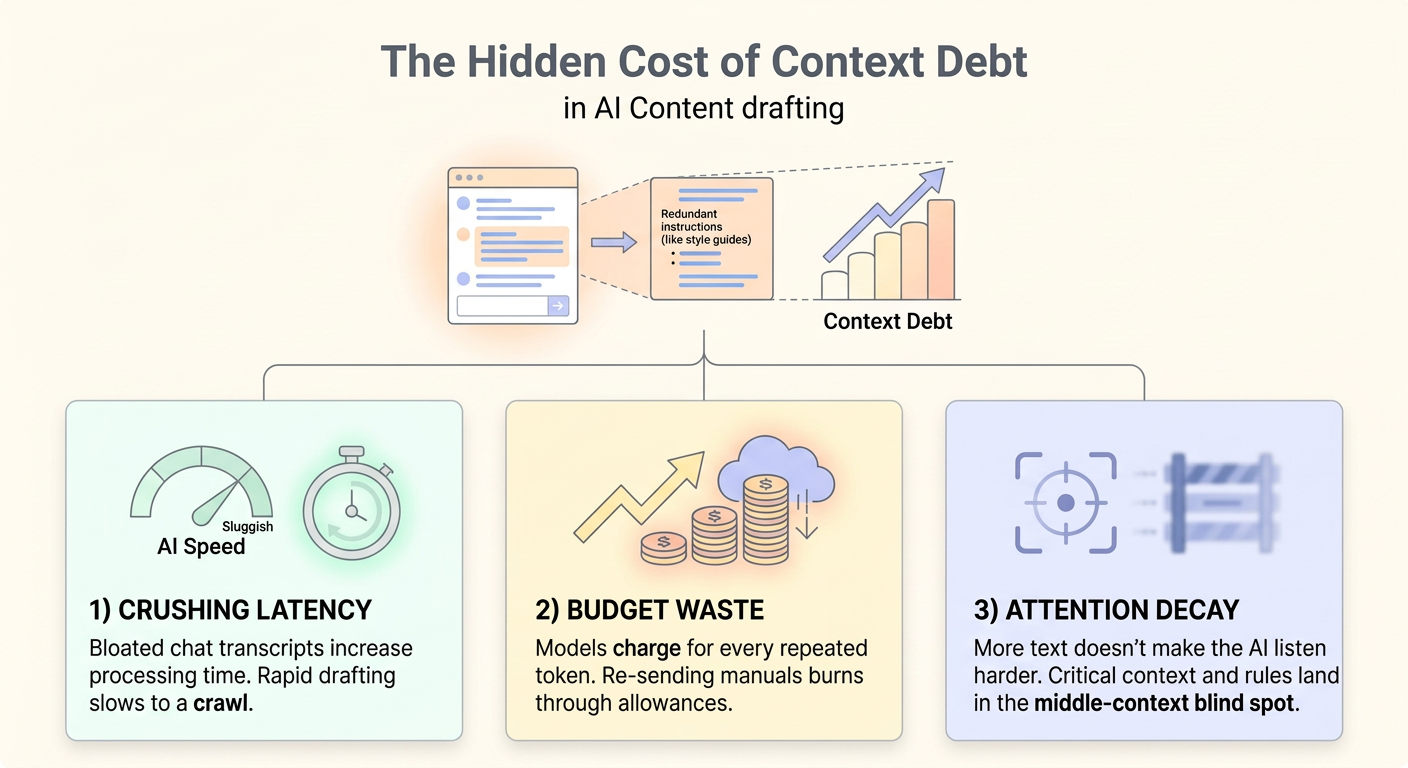
This practice causes three immediate problems:
Crushing latency: Processing a bloated chat history takes time. The quick, snappy drafting tool you opened to save time slows down to a sluggish crawl.
Budget waste: Language models charge for every token they read. Re-sending an 8-page voice manual on every prompt burns through your monthly credits without adding a single new idea to the page.
Attention decay: Shoving more text into the chat box does not make the model listen harder. It actually makes it harder for the AI to find your core points.
Have you ever tried reading a manuscript while someone keeps shouting a list of grammar rules into your ear? That is what prompt stuffing does to a language model.
Why Models Forget: The Mechanics of Attention Decay
When an AI drops your brand rules mid-draft, it is not being stubborn. It is responding to basic transformer mathematics.
In 2023, a research group from Stanford University, UC Berkeley, and Samaya AI published a landmark study titled Lost in the Middle: How Language Models Use Long Contexts in the Transactions of the Association for Computational Linguistics. The researchers tested how well major models retrieve information scattered throughout long prompts.
The results were striking. Language models do not distribute their attention evenly across an input window. Instead, they produce a distinct U-shaped performance curve:
High recall at the start: Information placed at the very beginning of the prompt gets processed reliably (primacy effect).
High recall at the finish: Instructions placed right at the end, right before the model generates its reply, get prioritized (recency effect).
A massive blind spot in the middle: When important details sit between the 25% and 75% marks of a long prompt, retrieval accuracy drops sharply—often falling by 20 percentage points or more.
Think about what happens during a normal drafting session. You drop your brand guidelines into message one. By message six, where do those guidelines sit?
They sit directly in the forgotten center of the transcript.
The AI does not deliberately ignore your style sheet. Mechanically, your rules have slipped into the model's blind spot. Telling the model to "pay closer attention" will not change the underlying math of transformer self-attention.
To maintain a consistent voice, you have to change how you feed information to the machine.
Style Guides Need Architecture, Not Better Prompts
In professional publishing, an editorial style sheet is not a rolling chat log.
Look at benchmark publishing manuals like the Mailchimp Content Style Guide or usability research from the Nielsen Norman Group on tone-of-voice dimensions. These organizations treat tone, voice, and grammar rules as permanent governing standards. They set boundaries on humor, formality, and technical depth before a single word gets written.
To get consistent results from AI, your workspace needs that exact same structural separation. You must separate what you want written from how it should be written.
Dimension | The Ad-Hoc Chat Box (Prompt Stuffing) | Structured Workspace Governance |
|---|---|---|
Rule Placement | Pasted repeatedly into the rolling message thread | Anchored in a permanent project layer above the chat |
Memory Stability | Guidelines drift into the middle dead zone and get dropped | Rules remain actively in view across every prompt and draft |
Token Consumption | Pays full price to re-read the same style sheet on every turn | Uses context caching to read source files at a fraction of the cost |
Handling Revisions | Rewrites the whole piece, forcing line-by-line proofreading | Delivers proposed changes as inline, non-destructive suggestions |
Author Control | The AI decides what gets kept or thrown away | The writer accepts or rejects every change individually |
Separating "What" from "How"
Notice the clarity this split creates:
"What to write" belongs in your immediate request: This changes with every prompt. "Draft the technical breakdown for section three." "Summarize the customer interview notes from yesterday." "Write three alternative conclusions focused on business ROI."
"How to write" belongs in your standing environment: This never changes during a project. Your target reading level, your point of view, your perspective on industry clichés, and your formatting requirements sit outside the conversation.
When you decouple these two elements, your brand voice never enters the chat transcript. It never slides down into the middle-context dead zone. The model approaches every new paragraph with the same clear editorial vision.
How Lyremi Solves Voice Drift: Knowledge and Rulebooks
This exact architectural split is how Lyremi is built.
Instead of forcing you to work inside a blank prompt box where past context constantly slips away, Lyremi organizes your work around a central project workspace. Your reference files, your drafts, and your standing editorial rules live together in one place.
Here is how Lyremi protects your brand voice across a complex, multi-thousand-word project:
1. Rulebooks That Stay Whole
In Lyremi, you can upload your full brand guidelines as a PDF, Word document, or text file. Right-click the document in your project explorer and choose Add to Knowledge (always follow).
Lyremi tags the file as a Rulebook.
Unlike vector-search tools that slice your documents into disjointed 300-word snippets, Lyremi reads Rulebooks in full every single time. Your negative constraints on page two stay connected to the tonal examples on page twelve. The model never loses the complete picture.
2. Standing Instructions in Knowledge
Right above your project files sits the Knowledge row. Click it to set short, permanent instructions that apply to every chat, research run, and document draft in that project.
Use this space for your non-negotiables:
Who is the reader? (e.g., "Experienced technical architects, not curious hobbyists.")
What is the tone? (e.g., "Plain-spoken, direct, and slightly skeptical. Never cheerful or corporate.")
What words are forbidden? (e.g., "Never use words like 'delve', 'tapestry', 'synergy', or 'landscape'.")
Once you save those notes, your workspace displays a status tag: Following … Knowledge. From that moment on, you never have to re-type those constraints again.
3. Smart Context Caching
Does reading an entire style guide with every request get expensive?
Not in Lyremi. When Composer Agent writes a long-form draft, it caches your source files, Knowledge rules, and cited research once per run. Each subsequent writing pass reads that cached material at roughly one-tenth of the usual cost. You get whole-file grounding without burning through your monthly allowance.
4. Non-Destructive Suggested Edits
When a draft needs adjustments, standard chatbots rewrite the whole page from scratch. That forces you into tedious comparison reading just to see what changed.
Lyremi works like a thoughtful human editor. When you ask for changes in an open doc, the updates arrive as suggestions. You see green text for additions and strikethroughs for removals. You click Accept or Reject on each suggestion, or review everything at once.
Nothing in your document changes unless you say so.
Step-by-Step Playbook: Anchoring Brand Voice in Your Next Draft
Ready to stop wrestling with forgetful prompt boxes? Here is the exact five-step workflow to keep your next long-form article on brand from title to sign-off:
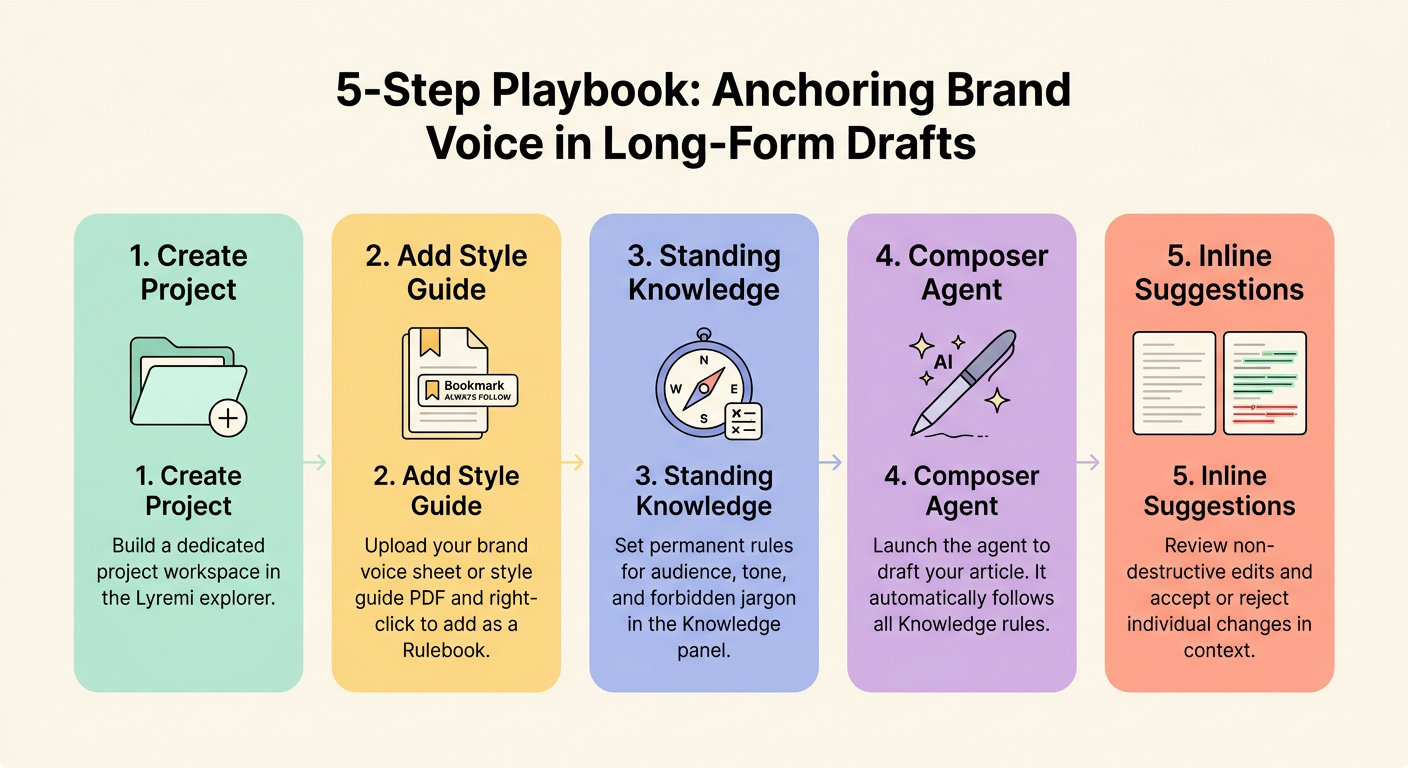
Create your project: In the explorer on the left, click New project… and give it a clear working title.
Add your style guide: Drag your brand voice PDF or editorial manual into the project explorer. Right-click the file and select Add to Knowledge (always follow).
Set your standing instructions: Click the Knowledge row at the top of your project. Write three to five direct sentences defining your audience, perspective, and banned jargon.
Draft with Composer Agent: Select Composer Agent from the mode menu. Let it plan the document outline, gather facts from your attached files, and draft the sections. It writes with your Knowledge rules locked in place.
Refine with inline suggestions: Open the generated document in the middle tab. If a paragraph feels stiff or misses an angle, ask for a tweak in the chat panel on the right. Review the proposed changes in place and accept the ones that make the piece stronger.
Stop Repeating Yourself
Good writing requires focus. When you spend half your workday copying and pasting tone rules into a chat box that forgets them ten minutes later, you lose that focus.
Language models do not need louder prompts. They need a better workspace.
By moving your brand guidelines out of temporary chat transcripts and into permanent project Knowledge, you protect your voice from memory loss. Your articles stay sharp. Your editorial team stops wasting hours on line-by-line proofreading. And your drafts finally sound like you wrote them.
Ready to Try This Workflow?
You can test this file-centered approach right now.
Explore the workspace: See how files, agents, and standing Knowledge connect at About Lyremi.
Try it free: Set up your first project, upload your brand voice sheet as a Rulebook, and experience grounded long-form drafting on the Lyremi Free plan.